Thursday, February 27, 2014

List of Engineering Scholarships in India


Indian Oil Corporation Ltd Scholarships
These scholarships are available for full time courses in which engineering students are also eligible. Scholarships are awarded to students having confirmed admission in the first year of fulltime engineering degree course. Students whose gross joint income of the family from all sources below Rs. 1,00,000 are only eligible.
Duration and amount of scholarship:
The amount of scholarship is Rs. 3000/- per month and the available number of scholarships are 300.
For more details : http://www.iocl.com/Aboutus/Scholarships.aspx
Indian School of Mines, Dhanbad Scholarships
Indian school of Mines Dhanbad offers various scholarships to the students enrolled in each course of the college. Merit Cum Means Scholarship is provided to 25% of students enrolled in each Course and Merit Cum Means Freeship to 10% of students enrolled in each Course. Scholarships Sponsored by outside organization/individuals to students enrolled at ISM Dhanbad include Budhwanti Mrig Memorial Educational Scholarship (For girl students), OP Jindal Engineering & Management Scholarships, Inspire Scholarship (funded by DST, GOI under the scheme “Innovation in Science Pursuit for Inspired Research (INSPIRE)” etc
For more details: http://www.ismdhanbad.ac.in/student/scholarship.htm
LIC Golden Jubilee Scholarships
‘LIC GOLDEN JUBILEE SCHOLARSHIP’ Scheme is aimed at supporting meritorious students belonging to economically weaker families pursuing Medicine, Engineering, Graduation in any discipline, Diploma Courses or in any field or other equivalent courses. To be eligible for the scheme, the annual income of parents/guardian of the student from all sources sholud not exceed ` 1,00,000/- per annum.
Amount and duration of the Scholarship:
Annual scholarship of Rs. 10,000 will be awarded to the selected candidates for the entire duration of his/her programme.
For more details: http://www.licindia.in/GJF_scholarship.htm
National Dairy Research Institute, Karnal
National Dairy Research Institute, Karnal, offers Scholarships to the meritorious B.Tech. (Dairy Technology) students who need financial assistance and who have good academic record and are making diligent efforts to pursue higher education.
Amount of Scholarship:
The National Talent Scholarship (NTS) @ Rs. 1000/- per month shall be awarded by Indian Council of Agricultural Research (ICAR) on merit provided that the domicile of the candidate is other than Haryana State.
Institute Scholarship at the rate of Rs. 7,560/- per month is offered to all the Master's students and Rs. 10,500/- per months to all the Ph.D. students of Indian Nationality.
For more details : http://www.ndri.res.in/ndri/Design/scholarship.html
NTPC Scholarship Scheme
Scholarships will be awarded by the NTPC for schedules caste/schedule tribe /physically challenged students pursuing full time degree course in engineering in any one of the following branches electrical, mechanical, instrumentation, computer science, electronics and telecommunications.
Value and duration of the scholarship:
The scholarship amount is 1500/- per month. The scholarship is paid from the second year of the course till the course duration.
For more details: http://www.ntpc.co.in/
Larsen and Toubro Ltd Scholarships
L&T LTD ECC- the construction division of L&T sponsors deserving engineering graduates interested in pursuing M.Tech. in Construction Technology & Management at IIT Delhi and Madras.
Amount and duration of the scholarship:
A monthly stipend of Rs. 9000 will be granted to select 40 engineering graduates for the 24-month course. Those who successfully completed the course will be considered for absorption in regular employment in the company.
For more details : http://www.lntecc.com/homepage/common/careers.htm
JNMF Fellowships & Scholarships for PH D study
JNMF Fellowships
The Jawaharlal Nehru Memorial Fund has instituted Jawaharlal Nehru Fellowships dedicated to the encouragement, support and patronage of higher learning and of free intellectual inquiry. The Fellowships are open to scholars in every discipline - the sciences as well as the humanities - and also to categories of people not normally covered by existing schemes such as writers, journalists, artists and civil servants - for undertaking not only projects of highly sophisticated and technical subjects but also for study in depth of current problems relevant to the India of today.
Eligibility: The Fellowships are open to Indian citizens for outstanding work and the Fellows have complete freedom to work at places of their choice within India.
Stipend:
The Fellowship is tenable for two years and carries a monthly stipend of Rs. 60,000/-, In addition, actual expenses on secretarial assistance, traveling and other contingencies are met by the Fund subject to a ceiling of Rs. 50,000/- per annum.
Selection:
The Jawaharlal Nehru Fellows are chosen by a Selection Committee consisting of distinguished persons in different fields of human Endeavor.
How to apply for a Fellowship
There is no printed form for application. The application may be sent in plain paper giving the following details:
1.Bio-data, along with details of original work.
2. Experience in the field of specialization.
3. Project proposed to be undertaken (A synopsis neatly typed in double space in not more than a thousand words)
4.A copy of recent passport size photograph.
5. Undertaking in the enclosed format.
Contact Address:
Applicants may send their particulars in triplicate, to Secretary, Jawaharlal Nehru Memorial Fund, Teen Murti House, New Delhi 110 001.
Note:
Those in Government service, either in a State or at the Centre, should send their applications through proper channel, with advance copy (in triplicate) to the Fund.
Last date: The Fellowship Scheme is a continuing one and there is no last date for receipt of applications.
JNMF Scholarships A scheme called ‘Jawaharlal Nehru Fellowships for Post-graduate Studies in India and abroad’ was initiated by the Ministry of Human Resource Development in 1987and later called “Jawaharlal Nehru Scholarships for Doctoral Studies”. Till 2010, a total of 549 scholarships have been awarded.
Categories of Scholarships
The scholarships are available to the following categories of students:
A) Indian Nationals for Ph.D. study in India; and
B) Nationals of other Asian countries for Ph.D. study in India.
Areas of Specialization/Subject
A candidate may apply for scholarship in any one of the following areas of specialisation:
1. Physical Sciences
2. Chemical Sciences
3, Mathematical Sciences
4. Biological Sciences
5. Computer Sciences
6. Engineering Sciences
7. Environmental Sciences
8. Comparative Studies in Religion and Culture
9. Indian History & Civilisation
10. Sociology
11. Economics
12. Jawaharlal Nehru Studies
Eligibility Conditions
At the time of making the application for scholarship, a candidate should
1. Hold a FIRST Class Post-graduate degree with minimum 60% marks in aggregate.
2. Already be registered/admitted for Ph.D. degree with a recognized University/Institution in India. Those who have applied for registration and have not yet been registered at the time of submission of application are not eligible to apply.
3. Not be above 35 years of age at the time of applying.
4. Be a full-time Ph.D. Scholar.
5. Have valid GATE /NET score.
Duration of Scholarship: Upto 2 years.
Value of Scholarship for both the categories:
a) Maintenance allowance including Tuition fee - Rs.12,000 per month
b) Annual contingent expenses for study tours within India, books, stationery, thesis costs, etc. - Rs. 15,000 per annum
How to apply for a JNMF scholarship To download application form:Click here
Enclosures:
The following documents are to be attached along with the Application Form:
1) A passport size photograph to be pasted on the form.
2) An attested copy of Ph.D. registration/admission letter from the College/University.
3) A synopsis of not more than 1500 words or about 3 pages of 1.5 spaced text.
4) University Doctoral Monitoring Committee's report or Ph.D. Supervisor's report as per details required in C-8 of the Application Form.
5) Attested copies of Postgraduate degree, mark sheet and all other educational certificates/ degrees showing marks obtained and the date of birth.
For more details: http://www.jnmf.in/index.html
UGC Junior Research Fellowship
The University Grants Commission awards Junior Research Fellowships in Engineering & Technology for the persons who have a Master's Degree in Engineering/ Technology / Pharmacy with at least 55% marks from a recognized University to provide an opportunity to research scholars to undertake advanced study and research in Engineering and Technology and leading to Ph.D.
Amount and duration of scholarships:
The fellowship of Rs.14,000/-p.m. for initial two years and Rs.15,000/-p.m. for remaining period. The tenure of fellowship is initially for a period of two years as a Junior Research Fellowship (JRF). The tenure will be extended for a further period of three years with enhanced emoluments as a Senior Research Fellowship (SRF).
For more details: http://www.ugc.ac.in/jrfet/amount_fellowship.aspx

JN Tata Endowment Loan Scholarships
JN TATA Endowment Loan Scholarships would be awarded for higher studies in all disciplines in which engineering graduates with good academic record are also eligible.
Amount of loan:
The loan amount (ranging between Rs. 60,000 and Rs. 4,00,000) awarded to each scholar and does not cover the full cost of studies. All applicants do not necessarily qualify for the maximum amount.
For more details: http://www.dorabjitatatrust.org/id/72/J.N.

Central Sector Scheme of Scholarships
The Ministry of Human Resources Development, Department of Higher Education, Government of India has introduced a new scholarship scheme titled Central Sector Scheme of Scholarship for College and University Students for graduate / postgraduate studies in colleges and universities and for professional courses such as engineering, medical etc. The students who have scored above 80th percentile in Class XII of 10+2 pattern or equivalent are eligible.
Amount and duration of scholarship:
82000 scholarships per annum (41000 for boys and 41000 for girls) will be awarded. The scholarship will be given at Rs.1000/- per month and would be paid for 10 months in an academic year.
For more details: http://mhrd.gov.in/national_scholarships

Wednesday, February 26, 2014

[SOLVED] Blank Screen in Windows 8 after Installing Avast

Your system got blank screen after Avast installed. Don't Worry!!!!! Just follow the simple steps.

Step 1: Turn ON your system and then LOGIN.

Step 2: Now, you got the blank screen. Press Ctrl+Alt+Delete. You will see the TASK MANAGER. Now, follow the pictures:


Copy-Paste: C:\Windows\explorer.exe
                    C:\Windows\Immersivecontrolpanel\SystemSetting.exe


Источник:http://how.dectype.com/how-to-solve-windows-8-black-screen-problem-after-login/


Now you can restart your system. No more blank screen. Job Done!!! 

Friday, January 10, 2014

How to enable sound from root in Linux/Ubuntu

Please follow this simple step if you have sound related problem in your Linux OS or Ubuntu. I think snapshot is not required as the step is simple.

Step 1. Login as ROOT.

Step 2. Goto STARTUP APPLICATION -> PREFERENCES.

Step 3. Click ADD. Now, COPY-PASTE or write the followings.

Name : Pulseaudio daemon
Command : /usr/bin/pulseaudio
Comment : Start the sound daemon

Step 4. Log out and then Login.

Cheers!!! :)

Tuesday, January 7, 2014

How to Create Bootable Windows 8 / 7 / Vista / XP / Linux USB Drive or Pendrive

You might face a lots of problem in making pendrive bootable. Also, you might be doing a lots of google regarding this. Making a Pendrive Bootable can do in two ways. One is using Command(CMD) and the other is by using software. Using command is a tough as you need to remember the commands. Even if you remember the commands it may not work. It is easy to do using software. But many software doesn't work properly. Now, I am sharing a process in a very simple and easy way.

*Make sure you are using windows 8, 7 or xp or any windows series.

You will need this software, WinSetupFromUSB_1-0-beta7. Download and extract from here 
Download WINRAR if you don't have any software to extract.

Watch my tutorial or follow the below steps :


Step 1: Plug in your Pendrive. [Recommending MIN. Pendrive Size: 2GB for XP, 4GB for WINDOWS 8 or 7]

Step 2: Format your Pendrive in FAT32 format. [Why FAT32? - It will boot your OS fast and fast format PD]

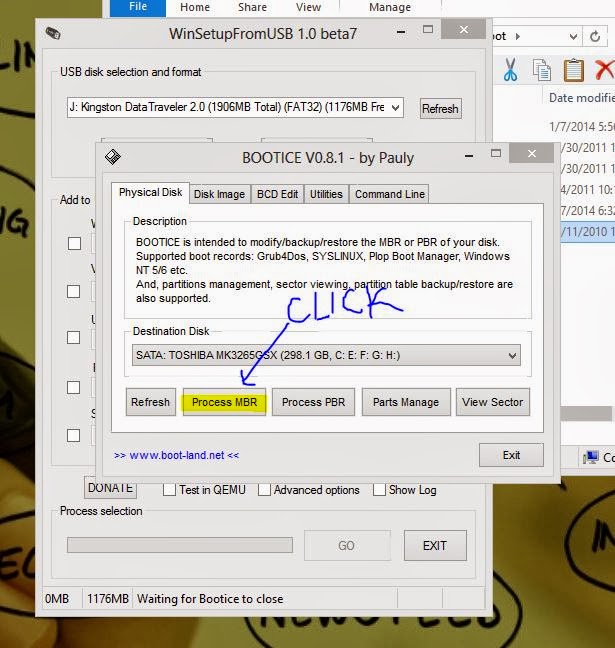
Step 3: Open the WinSetupFromUSB_1-0-beta7 software and follow the below pictures one by one. This pictures will be more precise to make you understand.


Now, EXIT all the pop-up windows and come back to the home screen. Follow the highlighted steps.


 Hope I helped you. :)

Thursday, January 2, 2014

[SOLVED] Windows 7 or 8 :Enable Remote Access Connection Manager

Some days back, I got an error regarding remote access connection AAA. I got frustrate. I did google, post in discussion, everything but helpless. I faced the problem for 4 days in my windows 7. Finally, after hunting down and deep thinking or by luck I sort it out. Now, I am sharing how to solved this error.

Step 1 : Run CMD. (press window key +R)

Step 2. Go to C:\Windows\System32\logfiles\WMI

Step 3. You will see a folder RtBackup. Just Right click on that.

Step 4. Go to  Properties -> Security -> Edit -> Add

Step 5. Type SYSTEM , the click Ok

Step 6. Permissions : ALLOW all except Special Permissions. Click OK.

Step 7. Reboot your system.

Now enjoy with smile....!!! :)

Sunday, October 6, 2013

How to book the busiest/slowest Indian TATKAL train ticket online?

The Indian TATKAL Ticket booking is open from 10AM. We face a lot of problems in booking the TATKAL train ticket. Sometimes we feel frustrate. Here, I am sharing a simple idea or you can say tip. I have tested this process.

***NOTE : Your internet connection should be good. 512kbps bandwidth is ok. DONOT click Twice on a button even if it loads slow in IRCTC site. Click once.
IF any error comes eg. Loading Fail, Problem Loading or anything. Just do REFRESH once not twice.
*** Please have patience. The page loading may take a second, 5seconds, 50seconds, 1mins, 5mins,10mins.....

***I Recommend this to do before 1hr of Tatkal booking. DON'T do COPY-PASTE in bank transaction.

Step 1: Download and install CHROME BROWSER if u don't have.

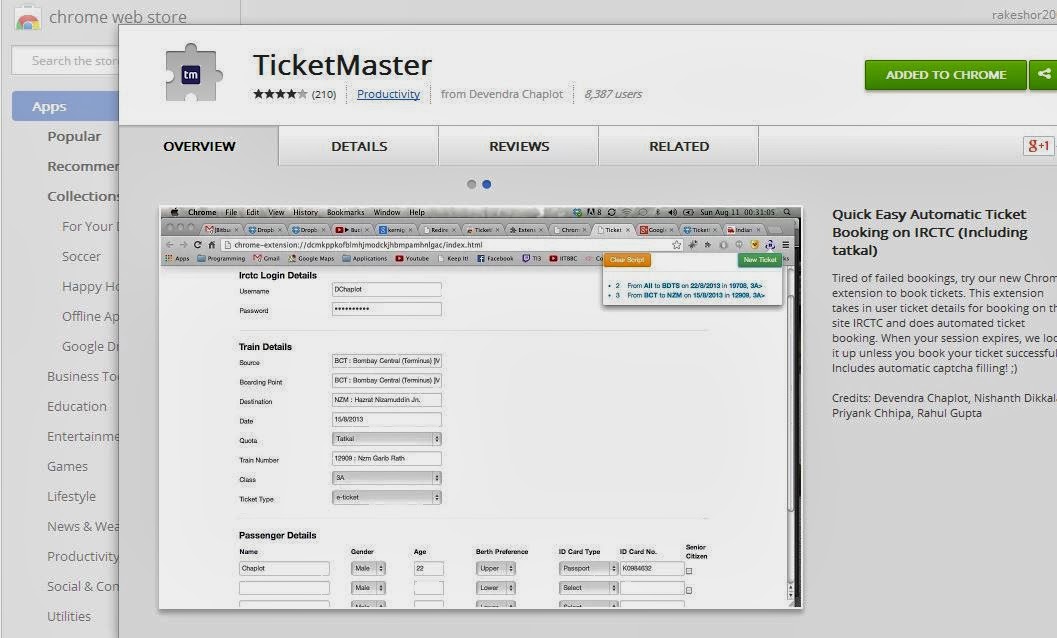
Step 2. Download and install TICKET MASTER add-on.


Step 3. Go to TICKET MASTER, you just installed. You will see in the Menu bar. Or Check the image here


Step 4. Fill up the details in the TICKET MASTER and Submit. Check a sample below.

Step 5. Now go to the https://www.irctc.co.in/ . The LOGIN, SEARCH will be done automatically as you have filled up details above. So, you don't need to click the login button.

Step 6. Click the Availability and Book Now  button. The CAPTCHA will be detected automatically, you don't need to type anything. Neither you don't need to click the GO button.

Happy Booking. :)

--Thanks to Ticket Master developers.


Tuesday, August 13, 2013

Security is important>> Lock a File or Folder without using any Software in Windows OS.

Many used to hide their important or confidential files using Folder Hide method in Windows OS. But this is a common method nowadays. Also many used software to hide or lock their files, but this takes a lot of time to compress the files or folder. So here, I am sharing a simple tip. Using this you can hide or lock a file or folder in a second.

Step 1: Open a NOTEPAD and COPY-PASTE the below code:

cls
@ECHO OFF
title Folder Locker
if EXIST "Control Panel.{21EC2020-3AEA-1069-A2DD-08002B30309D}" goto UNLOCK
if NOT EXIST Locker goto MDLOCKER
:CONFIRM
echo Are you sure u want to Lock the folder(Y/N)
set/p "cho=>"
if %cho%==Y goto LOCK
if %cho%==y goto LOCK
if %cho%==n goto END
if %cho%==N goto END
echo Invalid choice.
goto CONFIRM
:LOCK
ren Locker "Control Panel.{21EC2020-3AEA-1069-A2DD-08002B30309D}"
attrib +h +s "Control Panel.{21EC2020-3AEA-1069-A2DD-08002B30309D}"
echo Folder locked
goto End
:UNLOCK
echo Enter password to Unlock folder
set/p "pass=>"
if NOT %pass%==rakeshor here goto FAIL
attrib -h -s "Control Panel.{21EC2020-3AEA-1069-A2DD-08002B30309D}"
ren "Control Panel.{21EC2020-3AEA-1069-A2DD-08002B30309D}" Locker
echo Folder Unlocked successfully
goto End
:FAIL
echo Invalid password
goto end
:MDLOCKER
md Locker
echo Locker created successfully
goto End
:End 

2. Save the file in .bat format [ eg. Locker.bat] in any location wherever you want.


3. Open or Double-click the Locker.bat file. A LOCKER folder will be create automatically.

4. Copy-Paste all the files and folders that you want to Lock or Hide in that LOCKER folder.

5. Now, open the Locker.bat. Press Y key. and hit Enter. LOCKER folder will be disappeared.


6. If you want to open that LOCKER folder again. Open the Locker.bat again. A password will ask. Type the password that you have set in the code. [ My password is rakeshor]. Hit enter.

7. Now you will see the LOCKER folder.


***This method is not 100% secure.

Wednesday, January 18, 2012

TNS-12541 TNS-12560 TNS-00511 Linux Error: 111

 [oracle@localhost ~]$ lsnrctl

LSNRCTL for Linux: Version 10.2.0.1.0 - Production on 18-JAN-2012 22:45:15

Copyright (c) 1991, 2005, Oracle.  All rights reserved.

Welcome to LSNRCTL, type "help" for information.

LSNRCTL> reload
Connecting to (DESCRIPTION=(ADDRESS=(PROTOCOL=TCP)(HOST=localhost.localdomain)(PORT=1521)))
TNS-12541: TNS:no listener
 TNS-12560: TNS:protocol adapter error
  TNS-00511: No listener
   Linux Error: 111: Connection refused
LSNRCTL> service          
Connecting to (DESCRIPTION=(ADDRESS=(PROTOCOL=TCP)(HOST=localhost.localdomain)(PORT=1521)))
TNS-12541: TNS:no listener
 TNS-12560: TNS:protocol adapter error
  TNS-00511: No listener
   Linux Error: 111: Connection refused

This problem is related with IP address. To solve, just follow the following simple steps:-

[oracle@localhost ~]$ su - root
Password:
[root@localhost ~]# vi /etc/hosts        (copy & paste the below line)


127.0.0.1       localhost.localdomain   localhost


[root@localhost ~]# su - oracle
[oracle@localhost ~]$ lsnrctl start

LSNRCTL for Linux: Version 10.2.0.1.0 - Production on 18-JAN-2012 22:51:23

Copyright (c) 1991, 2005, Oracle.  All rights reserved.

Starting /u01/oracle/product/10.2.0/db_1/bin/tnslsnr: please wait...

TNSLSNR for Linux: Version 10.2.0.1.0 - Production
System parameter file is /u01/oracle/product/10.2.0/db_1/network/admin/listener.ora
Log messages written to /u01/oracle/product/10.2.0/db_1/network/log/listener.log
Listening on: (DESCRIPTION=(ADDRESS=(PROTOCOL=tcp)(HOST=localhost.localdomain)(PORT=1521)))

Connecting to (DESCRIPTION=(ADDRESS=(PROTOCOL=TCP)(HOST=localhost.localdomain)(PORT=1521)))
STATUS of the LISTENER
------------------------
Alias                     LISTENER
Version                   TNSLSNR for Linux: Version 10.2.0.1.0 - Production
Start Date                18-JAN-2012 22:51:24
Uptime                    0 days 0 hr. 0 min. 0 sec
Trace Level               off
Security                  ON: Local OS Authentication
SNMP                      OFF
Listener Parameter File   /u01/oracle/product/10.2.0/db_1/network/admin/listener.ora
Listener Log File         /u01/oracle/product/10.2.0/db_1/network/log/listener.log
Listening Endpoints Summary...
  (DESCRIPTION=(ADDRESS=(PROTOCOL=tcp)(HOST=localhost.localdomain)(PORT=1521)))
Services Summary...
Service "PLSExtProc" has 1 instance(s).
  Instance "PLSExtProc", status UNKNOWN, has 1 handler(s) for this service...
Service "orcl" has 1 instance(s).
  Instance "orcl", status UNKNOWN, has 1 handler(s) for this service...
The command completed successfully

[oracle@localhost ~]$

Saturday, January 14, 2012

HOW TO UNISTALL ORACLE COMPLETELY FROM LINUX REDHAT OR CENTOS.

Simply run the following commands:

[root@localhost ~]# rm -f /etc/oraInst.loc

[root@localhost ~]# rm -f /etc/oratab

[root@localhost ~]# rm -R -f /etc/oracle

Simple Steps : HOW TO INSTALL ORACLE 10G ON LINUX REDHAT5, CENTOS5 or above..etc.

1. Check minimum hardware requirements given by ORACLE.


2. Installed all Packages or Installed the following packages before Oracle installation:

-    compat-db-4.2.52-5.1.i386.rpm

-    sysstat-7.0.2-1.el5.i386.rpm

-   libaio-devel-0.3.106-3.2.i386.rpm

-   libXp-1.0.0-8.1.el5.i386.rpm


LOGIN ROOT: ( Use VI as editor)*

3. Add the following lines to the end of /etc/sysctl.conf file:

kernel.shmmax = 2147483648

kernel.shmall = 2097152

kernel.shmmni=4096

kernel.sem=250 32000 100 128

fs.file-max=65536

net.ipv4.ip_local_port_range=1024 65000

net.core.rmem_default=1048576

net.core.rmem_max=1048576

net.core.wmem_default=262144

net.core.wmem_max=262144

4. Execute this command:   /sbin/sysctl -p
or RESTART system to take changes.


5.Add the following lines in the /etc/security/limits.conf file (Shell limits for the Oracle User):

oracle              soft    nproc   2047

oracle              hard    nproc   16384

oracle              soft    nofile  1024

oracle              hard    nofile  65536


6. Add the following lines to /etc/pam.d/login file


session    required     /lib/security/pam_limits.so

session    required     pam_limits.so


7.Add the following lines to /etc/profile file in order to user oracle software:


if [ $USER = "oracle" ]; then

        if [ $SHELL = "/bin/ksh" ]; then

              ulimit -p 16384

              ulimit -n 65536

        else

              ulimit -u 16384 -n 65536

        fi

fi


8. RHEL5 or above is not supported platform so change  /etc/redhat-release as: Just copy & paste to terminal:


cp /etc/redhat-release /etc/redhat-release.original

echo "redhat-4" > /etc/redhat-release


9.Create groups and user for Oracle Installation using following commands:


groupadd  oinstall

groupadd  dba

useradd -m -g oinstall -G dba -d /home/oracle -s /bin/bash -c "Oracle Software Owner" oracle

passwd oracle


NEW TERMINAL

10. Create oracle home folder (COpy & paste to terminal):

cd /
mkdir u01
cd u01
mkdir oracle
cd oracle/
mkdir product
cd product/
mkdir 10.2.0
cd 10.2.0/
mkdir db_1
cd db_1/
pwd


LOGIN TO ORACLE

11.Unrar or extract oracle software

12. In terminal:

cd /
su root
chown -R oracle:oinstall /u01/
exit


13. Go to oracle software folder and execute in the terminal:

 ./runInstaller

 --installation completed--

14.Execute the following commands as root:

/home/oracle/oraInventory/orainstRoot.sh
cd $ORACLE_HOME/
./root.sh


15. Setting Oracle Enviroment: Add following lines to  /home/oracle/.bash_profile file:

>>For 32bit (x86) architecture:

export ORACLE_HOME=/u01/oracle/product/10.2.0/db_1

export LD_LIBRARY_PATH=$LD_LIBRARY_PATH:$ORACLE_HOME/lib

export ORACLE_SID=orcl

export PATH=$ORACLE_HOME/bin:$PATH

alias database ='export ORACLE_SID=orcl;sqlplus "/ as sysdba"'


>>For 64bit (x86_64) architecture:

export ORACLE_HOME=/u01/oracle/oracle/product/10.2.0/db_1

export LD_LIBRARY_PATH=$LD_LIBRARY_PATH:$ORACLE_HOME/lib32

export ORACLE_SID=orcl

export PATH=$ORACLE_HOME/bin:$PATH

alias database ='export ORACLE_SID=orcl;sqlplus “/ as sysdba”'


16. REBOOT SYSTEM and the login to ORACLE


Gud luck.. ;)

Saturday, December 24, 2011

VMware: Could not create IPC listener Pipe..

This problem is due to user deleted in the OS level. So, don't unistall VMWare. Just do this simple steps:
1. Create a new user  for VMWare which has by default:  __vmware_user__
 2. Then, run VMWare.
Gud luck.

Friday, December 23, 2011

CLONING A DATABASE USING RMAN (simple steps)

orcl = parent database,  (must be in OPEN mode)
dupli= duplicate database. (must be in NOMOUNT mode)


[oracle@localhost ~]$ ORACLE_SID=orcl
[oracle@localhost ~]$ rman target /

Recovery Manager: Release 10.2.0.1.0 - Production on Fri Dec 23 12:18:53 2011

Copyright (c) 1982, 2005, Oracle.  All rights reserved.

connected to target database: ORCL (DBID=1297119988)

RMAN> backup incremental level 0 database;

Starting backup at 23-DEC-11
using target database control file instead of recovery catalog
allocated channel: ORA_DISK_1
channel ORA_DISK_1: sid=152 devtype=DISK
channel ORA_DISK_1: starting incremental level 0 datafile backupset
channel ORA_DISK_1: specifying datafile(s) in backupset
input datafile fno=00001 name=/u01/oracle/product/10.2.0/db_1/oradata/orcl/system01.dbf
input datafile fno=00003 name=/u01/oracle/product/10.2.0/db_1/oradata/orcl/sysaux01.dbf
input datafile fno=00005 name=/u01/oracle/product/10.2.0/db_1/oradata/orcl/example01.dbf
input datafile fno=00002 name=/u01/oracle/product/10.2.0/db_1/oradata/orcl/undotbs01.dbf
input datafile fno=00004 name=/u01/oracle/product/10.2.0/db_1/oradata/orcl/users01.dbf
channel ORA_DISK_1: starting piece 1 at 23-DEC-11
channel ORA_DISK_1: finished piece 1 at 23-DEC-11
piece handle=/u01/oracle/product/10.2.0/db_1/flash_recovery_area/ORCL/backupset/2011_12_23/o1_mf_nnnd0_TAG20111223T121912_7h8939on_.bkp tag=TAG20111223T121912 comment=NONE
channel ORA_DISK_1: backup set complete, elapsed time: 00:01:48
channel ORA_DISK_1: starting incremental level 0 datafile backupset
channel ORA_DISK_1: specifying datafile(s) in backupset
including current control file in backupset
including current SPFILE in backupset
channel ORA_DISK_1: starting piece 1 at 23-DEC-11
channel ORA_DISK_1: finished piece 1 at 23-DEC-11
piece handle=/u01/oracle/product/10.2.0/db_1/flash_recovery_area/ORCL/backupset/2011_12_23/o1_mf_ncsn0_TAG20111223T121912_7h896s29_.bkp tag=TAG20111223T121912 comment=NONE
channel ORA_DISK_1: backup set complete, elapsed time: 00:00:07
Finished backup at 23-DEC-11

RMAN>  quit


Recovery Manager complete.
[oracle@localhost ~]$ mkdir /u01/oracle/product/10.2.0/db_1/oradata/dupli
[oracle@localhost ~]$ vi /u01/oracle/product/10.2.0/db_1/dbs/initdupli.ora

--------ENTRY-----------------
db_name=dupli
instance_name=dupli
db_file_name_convert=('/u01/oracle/product/10.2.0/db_1/oradata/orcl','/u01/oracle/product/10.2.0/db_1/oradata/dupli')
log_file_name_convert=('/u01/oracle/product/10.2.0/db_1/oradata/orcl','/u01/oracle/product/10.2.0/db_1/oradata/dupli')
compatible=10.2.0.1.0
SGA_TARGET=1G
SGA_MAX_SIZE=1G
------------------------------

[oracle@localhost ~]$ orapwd file=/u01/oracle/product/10.2.0/db_1/dbs/orapwdupli password=oracle force=y
[oracle@localhost ~]$ netmgr        ////create listener and service for both database////


[oracle@localhost ~]$ lsnrctl reload

LSNRCTL for Linux: Version 10.2.0.1.0 - Production on 23-DEC-2011 12:32:31

Copyright (c) 1991, 2005, Oracle.  All rights reserved.

Connecting to (DESCRIPTION=(ADDRESS=(PROTOCOL=IPC)(KEY=EXTPROC1)))
The command completed successfully
[oracle@localhost ~]$ tnsping dupli

TNS Ping Utility for Linux: Version 10.2.0.1.0 - Production on 23-DEC-2011 12:32:43

Copyright (c) 1997, 2005, Oracle.  All rights reserved.

Used parameter files:
/u01/oracle/product/10.2.0/db_1/network/admin/sqlnet.ora


Used TNSNAMES adapter to resolve the alias
Attempting to contact (DESCRIPTION = (ADDRESS_LIST = (ADDRESS = (PROTOCOL = TCP)(HOST = localhost.localdomain)(PORT = 1521))) (CONNECT_DATA = (SERVICE_NAME = dupli)))
OK (70 msec)
[oracle@localhost ~]$  ORACLE_SID=dupli
[oracle@localhost ~]$ sqlplus /nolog

SQL*Plus: Release 10.2.0.1.0 - Production on Fri Dec 23 13:04:25 2011

Copyright (c) 1982, 2005, Oracle.  All rights reserved.

SQL> conn /as sysdba
Connected.
SQL> create spfile from pfile='/u01/oracle/product/10.2.0/db_1/dbs/initdupli.ora';

File created.

SQL> startup force nomount;
ORACLE instance started.

Total System Global Area 1073741824 bytes
Fixed Size                  1223540 bytes
Variable Size             264242316 bytes
Database Buffers          805306368 bytes
Redo Buffers                2969600 bytes
SQL> quit
Disconnected from Oracle Database 10g Enterprise Edition Release 10.2.0.1.0 - Production
With the Partitioning, OLAP and Data Mining options
[oracle@localhost ~]$ ORACLE_SID=orcl
[oracle@localhost ~]$ sqlplus / as sysdba

SQL*Plus: Release 10.2.0.1.0 - Production on Fri Dec 23 13:06:42 2011

Copyright (c) 1982, 2005, Oracle.  All rights reserved.


Connected to:
Oracle Database 10g Enterprise Edition Release 10.2.0.1.0 - Production
With the Partitioning, OLAP and Data Mining options

SQL> alter system switch logfile;

System altered.

SQL> quit;
Disconnected from Oracle Database 10g Enterprise Edition Release 10.2.0.1.0 - Production
With the Partitioning, OLAP and Data Mining options
[oracle@localhost ~]$ rman target / auxiliary sys/oracle@dupli

Recovery Manager: Release 10.2.0.1.0 - Production on Fri Dec 23 13:07:02 2011

Copyright (c) 1982, 2005, Oracle.  All rights reserved.

connected to target database: ORCL (DBID=1297119988)
connected to auxiliary database: DUPLI (not mounted)

RMAN> duplicate target database to dupli;

Starting Duplicate Db at 23-DEC-11
using target database control file instead of recovery catalog
allocated channel: ORA_AUX_DISK_1
channel ORA_AUX_DISK_1: sid=36 devtype=DISK

contents of Memory Script:
{
   set until scn  681541;
   set newname for datafile  1 to
 "/u01/oracle/product/10.2.0/db_1/oradata/dupli/system01.dbf";
   set newname for datafile  2 to
 "/u01/oracle/product/10.2.0/db_1/oradata/dupli/undotbs01.dbf";
   set newname for datafile  3 to
 "/u01/oracle/product/10.2.0/db_1/oradata/dupli/sysaux01.dbf";
   set newname for datafile  4 to
 "/u01/oracle/product/10.2.0/db_1/oradata/dupli/users01.dbf";
   set newname for datafile  5 to
 "/u01/oracle/product/10.2.0/db_1/oradata/dupli/example01.dbf";
   restore
   check readonly
   clone database
   ;
}
executing Memory Script

executing command: SET until clause

executing command: SET NEWNAME

executing command: SET NEWNAME

executing command: SET NEWNAME

executing command: SET NEWNAME

executing command: SET NEWNAME

Starting restore at 23-DEC-11
using channel ORA_AUX_DISK_1

channel ORA_AUX_DISK_1: starting datafile backupset restore
channel ORA_AUX_DISK_1: specifying datafile(s) to restore from backup set
restoring datafile 00001 to /u01/oracle/product/10.2.0/db_1/oradata/dupli/system01.dbf
restoring datafile 00002 to /u01/oracle/product/10.2.0/db_1/oradata/dupli/undotbs01.dbf
restoring datafile 00003 to /u01/oracle/product/10.2.0/db_1/oradata/dupli/sysaux01.dbf
restoring datafile 00004 to /u01/oracle/product/10.2.0/db_1/oradata/dupli/users01.dbf
restoring datafile 00005 to /u01/oracle/product/10.2.0/db_1/oradata/dupli/example01.dbf
channel ORA_AUX_DISK_1: reading from backup piece /u01/oracle/product/10.2.0/db_1/flash_recovery_area/ORCL/backupset/2011_12_23/o1_mf_nnnd0_TAG20111223T125918_7h8cghgp_.bkp
channel ORA_AUX_DISK_1: restored backup piece 1
piece handle=/u01/oracle/product/10.2.0/db_1/flash_recovery_area/ORCL/backupset/2011_12_23/o1_mf_nnnd0_TAG20111223T125918_7h8cghgp_.bkp tag=TAG20111223T125918
channel ORA_AUX_DISK_1: restore complete, elapsed time: 00:01:15
Finished restore at 23-DEC-11
sql statement: CREATE CONTROLFILE REUSE SET DATABASE "DUPLI" RESETLOGS ARCHIVELOG
  MAXLOGFILES     16
  MAXLOGMEMBERS      3
  MAXDATAFILES      100
  MAXINSTANCES     8
  MAXLOGHISTORY      292
 LOGFILE
  GROUP  1 ( '/u01/oracle/product/10.2.0/db_1/oradata/dupli/redo01.log' ) SIZE 50 M  REUSE,
  GROUP  2 ( '/u01/oracle/product/10.2.0/db_1/oradata/dupli/redo02.log' ) SIZE 50 M  REUSE,
  GROUP  3 ( '/u01/oracle/product/10.2.0/db_1/oradata/dupli/redo03.log' ) SIZE 50 M  REUSE
 DATAFILE
  '/u01/oracle/product/10.2.0/db_1/oradata/dupli/system01.dbf'
 CHARACTER SET WE8ISO8859P1


contents of Memory Script:
{
   switch clone datafile all;
}
executing Memory Script

released channel: ORA_AUX_DISK_1
datafile 2 switched to datafile copy
input datafile copy recid=1 stamp=770648916 filename=/u01/oracle/product/10.2.0/db_1/oradata/dupli/undotbs01.dbf
datafile 3 switched to datafile copy
input datafile copy recid=2 stamp=770648916 filename=/u01/oracle/product/10.2.0/db_1/oradata/dupli/sysaux01.dbf
datafile 4 switched to datafile copy
input datafile copy recid=3 stamp=770648916 filename=/u01/oracle/product/10.2.0/db_1/oradata/dupli/users01.dbf
datafile 5 switched to datafile copy
input datafile copy recid=4 stamp=770648916 filename=/u01/oracle/product/10.2.0/db_1/oradata/dupli/example01.dbf

contents of Memory Script:
{
   set until scn  681541;
   recover
   clone database
    delete archivelog
   ;
}
executing Memory Script

executing command: SET until clause

Starting recover at 23-DEC-11
allocated channel: ORA_AUX_DISK_1
channel ORA_AUX_DISK_1: sid=36 devtype=DISK

starting media recovery

archive log thread 1 sequence 3 is already on disk as file /u01/oracle/product/10.2.0/db_1/flash_recovery_area/ORCL/archivelog/2011_12_23/o1_mf_1_3_7h8cwoqb_.arc
archive log filename=/u01/oracle/product/10.2.0/db_1/flash_recovery_area/ORCL/archivelog/2011_12_23/o1_mf_1_3_7h8cwoqb_.arc thread=1 sequence=3
media recovery complete, elapsed time: 00:00:01
Finished recover at 23-DEC-11

contents of Memory Script:
{
   shutdown clone;
   startup clone nomount ;
}
executing Memory Script

database dismounted
Oracle instance shut down

connected to auxiliary database (not started)
Oracle instance started

Total System Global Area    1073741824 bytes

Fixed Size                     1223540 bytes
Variable Size                264242316 bytes
Database Buffers             805306368 bytes
Redo Buffers                   2969600 bytes
sql statement: CREATE CONTROLFILE REUSE SET DATABASE "DUPLI" RESETLOGS ARCHIVELOG
  MAXLOGFILES     16
  MAXLOGMEMBERS      3
  MAXDATAFILES      100
  MAXINSTANCES     8
  MAXLOGHISTORY      292
 LOGFILE
  GROUP  1 ( '/u01/oracle/product/10.2.0/db_1/oradata/dupli/redo01.log' ) SIZE 50 M  REUSE,
  GROUP  2 ( '/u01/oracle/product/10.2.0/db_1/oradata/dupli/redo02.log' ) SIZE 50 M  REUSE,
  GROUP  3 ( '/u01/oracle/product/10.2.0/db_1/oradata/dupli/redo03.log' ) SIZE 50 M  REUSE
 DATAFILE
  '/u01/oracle/product/10.2.0/db_1/oradata/dupli/system01.dbf'
 CHARACTER SET WE8ISO8859P1


contents of Memory Script:
{
   catalog clone datafilecopy  "/u01/oracle/product/10.2.0/db_1/oradata/dupli/undotbs01.dbf";
   catalog clone datafilecopy  "/u01/oracle/product/10.2.0/db_1/oradata/dupli/sysaux01.dbf";
   catalog clone datafilecopy  "/u01/oracle/product/10.2.0/db_1/oradata/dupli/users01.dbf";
   catalog clone datafilecopy  "/u01/oracle/product/10.2.0/db_1/oradata/dupli/example01.dbf";
   switch clone datafile all;
}
executing Memory Script

cataloged datafile copy
datafile copy filename=/u01/oracle/product/10.2.0/db_1/oradata/dupli/undotbs01.dbf recid=1 stamp=770648922

cataloged datafile copy
datafile copy filename=/u01/oracle/product/10.2.0/db_1/oradata/dupli/sysaux01.dbf recid=2 stamp=770648922

cataloged datafile copy
datafile copy filename=/u01/oracle/product/10.2.0/db_1/oradata/dupli/users01.dbf recid=3 stamp=770648922

cataloged datafile copy
datafile copy filename=/u01/oracle/product/10.2.0/db_1/oradata/dupli/example01.dbf recid=4 stamp=770648922

datafile 2 switched to datafile copy
input datafile copy recid=1 stamp=770648922 filename=/u01/oracle/product/10.2.0/db_1/oradata/dupli/undotbs01.dbf
datafile 3 switched to datafile copy
input datafile copy recid=2 stamp=770648922 filename=/u01/oracle/product/10.2.0/db_1/oradata/dupli/sysaux01.dbf
datafile 4 switched to datafile copy
input datafile copy recid=3 stamp=770648922 filename=/u01/oracle/product/10.2.0/db_1/oradata/dupli/users01.dbf
datafile 5 switched to datafile copy
input datafile copy recid=4 stamp=770648922 filename=/u01/oracle/product/10.2.0/db_1/oradata/dupli/example01.dbf

contents of Memory Script:
{
   Alter clone database open resetlogs;
}
executing Memory Script

database opened
Finished Duplicate Db at 23-DEC-11

RMAN> quit


Recovery Manager complete.
[oracle@localhost ~]$ ORACLE_SID=dupli
[oracle@localhost ~]$ sqlplus / as sysdba

SQL*Plus: Release 10.2.0.1.0 - Production on Fri Dec 23 13:10:31 2011

Copyright (c) 1982, 2005, Oracle.  All rights reserved.


Connected to:
Oracle Database 10g Enterprise Edition Release 10.2.0.1.0 - Production
With the Partitioning, OLAP and Data Mining options

SQL> select status from v$instance;

STATUS
------------
OPEN


Thursday, December 22, 2011

Enable and Disable user password complexity of an Oracle Database


[oracle@localhost ~]$ ORACLE_SID=orcl
[oracle@localhost ~]$ sqlplus / as sysdba

SQL*Plus: Release 10.2.0.1.0 - Production on Fri Dec 23 11:51:30 2011

Copyright (c) 1982, 2005, Oracle.  All rights reserved.


Connected to:
Oracle Database 10g Enterprise Edition Release 10.2.0.1.0 - Production
With the Partitioning, OLAP and Data Mining options

SQL> create user rakeshor identified by rakeshor;

User created.


SQL> @/u01/oracle/product/10.2.0/db_1/rdbms/admin/utlpwdmg.sql;

Function created.


Profile altered.

SQL> select object_name from dba_objects where object_type='FUNCTION' and object_name like 'VERIFY%';

OBJECT_NAME
--------------------------------------------------------------------------------
VERIFY_FUNCTION

SQL> select username,profile from dba_users where username='RAKESHOR';

USERNAME                       PROFILE
------------------------------ ------------------------------
RAKESHOR                       DEFAULT

SQL> alter profile default limit password_verify_function verify_function;    

Profile altered.

SQL> password rakeshor
Changing password for rakeshor
New password:                                                   (password=pass)
Retype new password:
ERROR:
ORA-28003: password verification for the specified password failed
ORA-20003: Password should contain at least one digit, one character and one
punctuation


Password unchanged

/////Disable Verify_function//////////

SQL> ALTER PROFILE "DEFAULT" LIMIT PASSWORD_VERIFY_FUNCTION NULL;

Profile altered.

SQL> password rakeshor
Changing password for rakeshor
New password:                                                                  (password=pass)
Retype new password:
Password changed
SQL>

ora 38706 ora 38714 (flashback on)

For these error the database must be shutdown cleanly and then startup mount..

STEPS:

[oracle@localhost ~]$ sqlplus / as sysdba

SQL*Plus: Release 10.2.0.1.0 - Production on Fri Dec 23 09:02:00 2011

Copyright (c) 1982, 2005, Oracle.  All rights reserved.

Connected to an idle instance.

SQL> startup mount
ORACLE instance started.

Total System Global Area  188743680 bytes
Fixed Size                  1218436 bytes
Variable Size              79693948 bytes
Database Buffers          104857600 bytes
Redo Buffers                2973696 bytes
Database mounted.
SQL> alter database archivelog;

Database altered.

SQL> alter database flashback on;
alter database flashback on
*
ERROR at line 1:
ORA-38706: Cannot turn on FLASHBACK DATABASE logging.
ORA-38714: Instance recovery required.


SQL> shutdown immediate
ORA-01109: database not open


Database dismounted.
ORACLE instance shut down.
SQL> startup mount
ORACLE instance started.

Total System Global Area  188743680 bytes
Fixed Size                  1218436 bytes
Variable Size              79693948 bytes
Database Buffers          104857600 bytes
Redo Buffers                2973696 bytes
Database mounted.
SQL> alter database flashback on;
alter database flashback on
*
ERROR at line 1:
ORA-38706: Cannot turn on FLASHBACK DATABASE logging.
ORA-38714: Instance recovery required.


SQL> shutdown
ORA-01109: database not open


Database dismounted.
ORACLE instance shut down.
SQL> startup mount
ORACLE instance started.

Total System Global Area  188743680 bytes
Fixed Size                  1218436 bytes
Variable Size              79693948 bytes
Database Buffers          104857600 bytes
Redo Buffers                2973696 bytes
Database mounted.

SQL> alter database open;

Database altered.

SQL> shutdown
Database closed.
Database dismounted.
ORACLE instance shut down.

SQL> startup mount
ORACLE instance started.

Total System Global Area  188743680 bytes
Fixed Size                  1218436 bytes
Variable Size              79693948 bytes
Database Buffers          104857600 bytes
Redo Buffers                2973696 bytes
Database mounted.
SQL> alter database flashback on;

Database altered.

SQL>